Building Reusable UI Components
Reviewed & published by Brayan K
A reusable UI component is a self-contained, themeable building block — like a button or card — built with consistent class naming such as BEM and CSS custom properties as its public API, so you can drop it in anywhere and restyle it without rewriting it.
Part of the free HTML & CSS course at LearnCodingFast — hands-on lessons with examples you run in your browser, plus practice exercises and a quick quiz.
By the end of this lesson you'll be able to design a small, themeable component system — a button with variants and sizes, and a compound card — using BEM naming, modifier classes, and CSS custom properties as the component's public API.
💡 Think of It Like This
A reusable component is like a LEGO brick. A single 2×4 brick is one shape (the base), but it comes in red, blue, or green (variants) and in tall or short heights (sizes). You design each brick type once, then snap copies together into any structure — you never re-mould a brick for every model.
The studs on top are the brick's API: a fixed, documented way to connect to it. Your component's CSS custom properties are exactly that — a small set of named knobs (--primary, --radius) that anyone can turn from the outside, without prising the brick open to see how it's made.
1. The Pattern: Base Class + Modifier Classes
A component system follows one consistent shape: a base class that holds the shared structure (layout, spacing, corner radius), plus small modifier classes that change one visual thing each — a colour, a size, a state. You put several classes on one element and they compose: class="btn btn--primary btn--lg".
The win is that the base stays written once. Five colours times three sizes is eight tiny classes that stack, not fifteen fat ones that each repeat the padding and radius. BEM naming keeps this readable: block (the component), block__element (a part inside it), and block--modifier (a variant or state).
| Role | BEM form | Example |
|---|---|---|
| Block (base) | .block | .btn · .card |
| Element (a part) | .block__part | .card__header |
| Modifier (variant) | .block--variant | .btn--primary |
| Modifier (state) | .block--state | .form-input--error |
2. Worked Example — A Button System
Here is the pattern in full. The .btn base sets layout, padding, and radius and no colour at all. Each .btn--* modifier touches only the properties it owns, so colour, size, and state never fight each other and can be combined freely. Every colour and the radius come from :root tokens — that block is the button's theming API.
<!DOCTYPE html>
<html lang="en">
<head>
  <meta charset="UTF-8">
  <title>Button system</title>
  <style>
    :root {
      /* Design tokens = the button's public API. Override these to re-theme. */
      --primary: #1976D2;        /* brand colour, reused by every primary button */
      --primary-hover: #1565C0;  /* darker shade for :hover */
      --danger: #D32F2F;
      --danger-hover: #B71C1C;
      --radius: 8px;             /* one corner radius for the whole UI */
    }

    body { font-family: system-ui, sans-serif; padding: 24px; }
    .demo { display: flex; flex-wrap: wrap; gap: 8px; align-items: center; margin: 12px 0; }
    h2 { color: #1565C0; }

    /* BASE class: every button shares this structure (layout, spacing, radius).
       It deliberately sets NO colour — that is a variant's job. */
    .btn {
      display: inline-flex; align-items: center; gap: 8px;
      padding: 10px 20px; border: none; border-radius: var(--radius);
      font-weight: 600; font-size: 0.95rem; cursor: pointer;
      transition: background 0.2s, transform 0.1s;
    }
    .btn:active { transform: scale(0.97); }                 /* press feedback */

    /* VARIANT modifiers: change ONLY colour, nothing structural. */
    .btn--primary { background: var(--primary); color: white; }
    .btn--primary:hover { background: var(--primary-hover); }
    .btn--danger { background: var(--danger); color: white; }
    .btn--danger:hover { background: var(--danger-hover); }
    .btn--outline { background: transparent; border: 2px solid var(--primary); color: var(--primary); }
    .btn--outline:hover { background: var(--primary); color: white; }

    /* SIZE modifiers: change ONLY padding + font-size. */
    .btn--sm { padding: 6px 14px; font-size: 0.85rem; }
    .btn--lg { padding: 14px 28px; font-size: 1.1rem; }

    /* STATE: maps to the real :disabled attribute, not a colour choice. */
    .btn:disabled { opacity: 0.5; cursor: not-allowed; }
  </style>
</head>
<body>
  <h2>Variants (colour)</h2>
  <div class="demo">
    <button class="btn btn--primary">Primary</button>
    <button class="btn btn--danger">Danger</button>
    <button class="btn btn--outline">Outline</button>
  </div>

  <h2>Sizes (compose base + variant + size)</h2>
  <div class="demo">
    <button class="btn btn--primary btn--sm">Small</button>
    <button class="btn btn--primary">Default</button>
    <button class="btn btn--primary btn--lg">Large</button>
  </div>

  <h2>State</h2>
  <div class="demo">
    <button class="btn btn--primary">Enabled</button>
    <button class="btn btn--primary" disabled>Disabled</button>
  </div>

  <!-- ✅ Expected: one .btn base, small colour/size modifiers stacked on top.
       Change --primary in :root and EVERY primary/outline button retints. -->
  <!-- ✅ Expected result, measured in a real browser:
     .demo -> display: flex
     .btn -> display: flex
     .btn:disabled -> opacity: 0.5
     .btn -> count: 8
  -->
</body>
</html>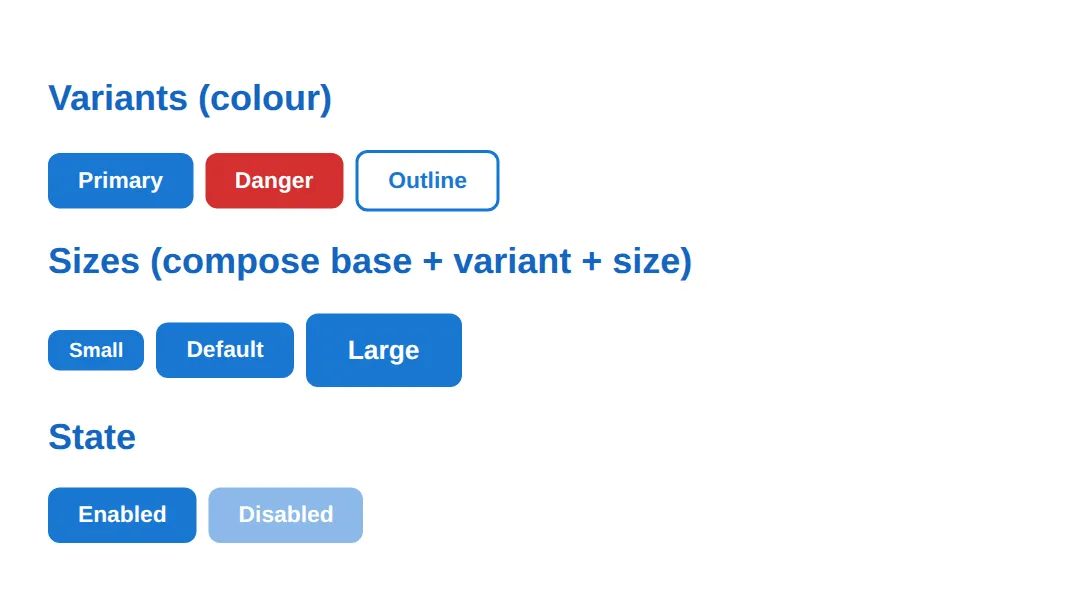
3. Worked Example — A Compound Card
A card is a compound component: a block made of several named parts — .card__header, .card__body, .card__footer. Each part is optional, so the same block works whether a card has all three or just a body. Notice the selectors stay flat — one class per part — instead of brittle chains like .card div p, so a card's styles never leak into content you drop inside it.
<!DOCTYPE html>
<html lang="en">
<head>
  <meta charset="UTF-8">
  <title>Card system</title>
  <style>
    :root {
      --surface: #ffffff;       /* card background */
      --border: #e0e0e0;
      --muted: #757575;         /* secondary text */
      --primary: #1976D2;
      --radius: 12px;
      --shadow: 0 2px 8px rgba(0,0,0,0.08);
    }

    body { font-family: system-ui, sans-serif; padding: 24px; background: #fafafa; }
    .grid { display: grid; grid-template-columns: repeat(auto-fill, minmax(260px, 1fr)); gap: 20px; }

    /* BLOCK: the card wrapper. */
    .card {
      background: var(--surface); border: 1px solid var(--border);
      border-radius: var(--radius); overflow: hidden; box-shadow: var(--shadow);
    }
    /* ELEMENTS: parts that only exist inside a card (BEM __). Each is optional. */
    .card__header { padding: 16px 20px; border-bottom: 1px solid var(--border); font-weight: 700; }
    .card__body { padding: 20px; }
    .card__body p { margin: 0; color: var(--muted); line-height: 1.7; }
    .card__footer { padding: 12px 20px; border-top: 1px solid var(--border); display: flex; gap: 8px; justify-content: flex-end; }

    /* MODIFIERS: variants of the whole block (BEM --). */
    .card--accent { border-top: 4px solid var(--primary); }
    .card--clickable { cursor: pointer; transition: box-shadow 0.2s, transform 0.2s; }
    .card--clickable:hover { box-shadow: 0 8px 24px rgba(0,0,0,0.12); transform: translateY(-2px); }
    .card--bordered { box-shadow: none; border: 2px solid var(--border); }

    .btn { padding: 8px 16px; border: none; border-radius: 8px; font-weight: 600; cursor: pointer; font-size: 0.85rem; }
    .btn--primary { background: var(--primary); color: white; }
    .btn--outline { background: transparent; border: 1px solid var(--border); color: var(--muted); }
  </style>
</head>
<body>
  <div class="grid">
    <!-- All three parts present -->
    <div class="card card--accent">
      <div class="card__header">Settings</div>
      <div class="card__body"><p>Accent variant adds a blue top border. Header, body and footer are all separate elements.</p></div>
      <div class="card__footer">
        <button class="btn btn--outline">Cancel</button>
        <button class="btn btn--primary">Save</button>
      </div>
    </div>

    <!-- Body only: elements are optional, so the same block flexes -->
    <div class="card card--clickable">
      <div class="card__body"><p>Just a body, plus the clickable modifier so the whole card lifts on hover.</p></div>
    </div>

    <!-- A different modifier, identical structure -->
    <div class="card card--bordered">
      <div class="card__body"><p>No shadow — the bordered modifier swaps depth for a clean outline.</p></div>
    </div>
  </div>

  <!-- ✅ Expected: three cards built from ONE .card block. Each uses a different
       --modifier and includes only the __elements it needs. -->
  <!-- ✅ Expected result, measured in a real browser:
     .grid -> display: grid
     .card -> overflow: hidden
     .card__footer -> display: flex
     .card--clickable -> cursor: pointer
     .card -> count: 3
  -->
</body>
</html>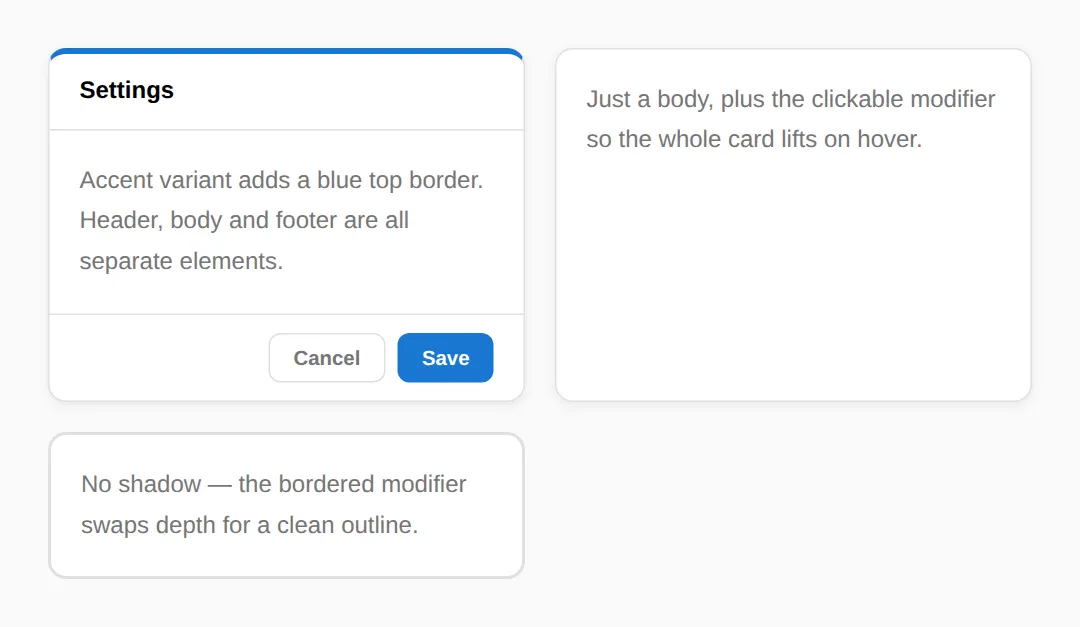
🎯 Your Turn #1 — Add a variant and a size to the button
The .btn base is done. Add a success colour variant and a small size, then apply both to a button. Fill in the blanks marked ___ and run it.
<!DOCTYPE html>
<html lang="en">
<head>
  <meta charset="UTF-8">
  <title>Your Turn 1</title>
  <style>
    /* 🎯 YOUR TURN — fill in the blanks marked ___ */

    :root {
      --primary: #1976D2;
      --success: #2E7D32;   /* a green token, ready to use */
      --radius: 8px;
    }

    body { font-family: system-ui, sans-serif; padding: 24px; }
    .demo { display: flex; gap: 8px; align-items: center; }

    /* BASE class — already complete, do not change it. */
    .btn {
      padding: 10px 20px; border: none; border-radius: var(--radius);
      font-weight: 600; font-size: 0.95rem; cursor: pointer; color: white;
    }
    .btn--primary { background: var(--primary); }

    /* 1) Add a success variant that ONLY sets the background colour. */
    ___                       /* 👉 add:  .btn--success { background: var(--success); } */

    /* 2) Add a small size that ONLY shrinks padding and font-size. */
    ___                       /* 👉 add:  .btn--sm { padding: 6px 14px; font-size: 0.85rem; } */
  </style>
</head>
<body>
  <div class="demo">
    <button class="btn btn--primary">Primary</button>

    <!-- 3) Make this button green AND small by adding two classes. -->
    <button class="btn ___">Small success</button>
                       <!-- 👉 replace ___ with  btn--success btn--sm -->
  </div>

  <!-- ✅ Expected: a normal blue Primary button, and a smaller GREEN button
       beside it — built by stacking btn + btn--success + btn--sm. -->
</body>
</html>
🎯 Your Turn #2 — Add a card element and a modifier
This card has a body but no footer, and no way to highlight it. Add a .card__footer element and a .card--accent modifier, then use them in the markup.
<!DOCTYPE html>
<html lang="en">
<head>
  <meta charset="UTF-8">
  <title>Your Turn 2</title>
  <style>
    /* 🎯 YOUR TURN — fill in the blanks marked ___ */

    :root { --surface: #fff; --border: #e0e0e0; --primary: #1976D2; --radius: 12px; }

    body { font-family: system-ui, sans-serif; padding: 24px; background: #fafafa; }

    /* BLOCK + existing elements — already complete. */
    .card { background: var(--surface); border: 1px solid var(--border); border-radius: var(--radius); overflow: hidden; max-width: 320px; }
    .card__header { padding: 16px 20px; border-bottom: 1px solid var(--border); font-weight: 700; }
    .card__body { padding: 20px; }

    /* 1) Add a footer ELEMENT (note the __ ). Give it padding, a top border,
          and lay its buttons out to the right with flexbox. */
    ___    /* 👉 add:  .card__footer { padding: 12px 20px; border-top: 1px solid var(--border); display: flex; gap: 8px; justify-content: flex-end; } */

    /* 2) Add an accent MODIFIER (note the -- ) = a 4px coloured top border. */
    ___    /* 👉 add:  .card--accent { border-top: 4px solid var(--primary); } */

    .btn { padding: 8px 16px; border: none; border-radius: 8px; font-weight: 600; cursor: pointer; background: var(--primary); color: white; }
  </style>
</head>
<body>
  <!-- 3) Add the accent modifier class to this card. -->
  <div class="card ___">                <!-- 👉 replace ___ with  card--accent -->
    <div class="card__header">Confirm</div>
    <div class="card__body">Are you sure you want to continue?</div>

    <!-- 4) Add the footer element here with one button inside. -->
    ___    <!-- 👉 add:  <div class="card__footer"><button class="btn">OK</button></div> -->
  </div>

  <!-- ✅ Expected: a card with a blue top accent bar, a header, a body, and a
       footer whose button sits at the bottom-right. -->
</body>
</html>
🧩 Mini-Challenge — A badge component from scratch
Support is faded now — only an outline is given. Build a small badge component (a pill label) with a base class and colour variants, driven by tokens. Use the button worked example as your reference if you get stuck.
<!DOCTYPE html>
<html lang="en">
<head>
  <meta charset="UTF-8">
  <title>Mini-Challenge</title>
  <style>
    /* 🧩 MINI-CHALLENGE: a reusable badge (pill label) component
       1. In :root, declare colour tokens:
            --info (a blue), --success (a green), --danger (a red)
       2. Write a BASE class .badge with the shared pill shape:
            inline-block, small padding (e.g. 2px 10px), border-radius: 99px,
            a small bold font. Set NO colour here.
       3. Write three VARIANT modifiers that ONLY set colours, each reading a token:
            .badge--info, .badge--success, .badge--danger
            (e.g. background: var(--info); color: white;)
       4. In the body, show one badge of each variant by stacking classes,
            e.g. class="badge badge--success"

       ✅ Expected: three pill badges side by side — blue, green, red — that all
          share the .badge shape and differ only by their --variant. Changing a
          token in :root retints every badge of that variant at once. */

    /* your code here */
  </style>
</head>
<body>

  <!-- your markup here: one <span> per variant, e.g. <span class="badge badge--info">Info</span> -->

</body>
</html>
⚠️ Common Errors (and the fix)
- Overly specific selectors. Targeting parts with .card div p or styling by ID (#submit) raises specificity, so a later variant class can't override it and an unrelated nested paragraph gets caught too. Fix: give each part one class — .card__body — and target that single class.
- Hard-coded values instead of tokens. Writing background: #1976D2 in ten rules means ten edits to rebrand, and one missed instance breaks consistency. Fix: declare --primary once and use background: var(--primary) everywhere.
- Leaking styles. Putting colour on the base class (.btn { background: blue; }) forces every variant to fight it back. Fix: keep the base structural only; let each --modifier own exactly the properties it changes.
- One class per combination. Writing .btn-primary-large-disabled explodes into dozens of classes. Fix: compose small modifiers on the element — class="btn btn--primary btn--lg".
- Wrong BEM separators. .card-header reads as a sibling block, not a part of the card. Fix: use __ for elements and -- for modifiers: .card__header, .card--accent.
📋 Quick Reference
| Goal | Use this |
|---|---|
| Define the base (structure only) | .btn { padding; border-radius; ... } |
| Add a colour variant | .btn--primary { background: var(--primary); } |
| Add a size variant | .btn--lg { padding: 14px 28px; } |
| Compose on an element | class="btn btn--primary btn--lg" |
| Name an inner part (element) | .card__header |
| Name a variant (modifier) | .card--accent |
| Expose a theming API | :root { --primary: #1976D2; } |
| Map a state to an attribute | .btn:disabled { opacity: 0.5; } |
🎉 Lesson Complete
You can now design small, themeable component systems instead of one-off styles. The essentials:
- ✅ A component = a base class (structure) plus small modifier classes (one job each)
- ✅ Compose variants on an element: class="btn btn--primary btn--lg"
- ✅ Name with BEM: block, block__element, block--modifier
- ✅ Compound components keep each part a flat, optional class — no deep .card div p chains
- ✅ Custom properties are the component's public API — re-theme by overriding a token
- ✅ Separate variants (a design choice) from states (disabled, error) so they compose freely
Practice quiz
What do the three parts of BEM stand for?
- Base, Element, Method
- Box, Edge, Margin
- Block, Element, Modifier
- Block, Engine, Module
Answer: Block, Element, Modifier. BEM = Block (the component, .card), Element (a part inside it, .card__title), and Modifier (a variant or state, .card--featured).
In BEM, which separator marks an element (a part inside a block)?
- A double underscore, like .card__title
- A single dash, like .card-title
- A double dash, like .card--title
- A dot, like .card.title
Answer: A double underscore, like .card__title. Elements use a double underscore: .card__header. A double dash (--) marks a modifier; .card-header reads as a separate block.
In BEM, which separator marks a modifier (a variant or state)?
- __ (double underscore)
- A single underscore
- A slash
- -- (double dash), like .btn--primary
Answer: -- (double dash), like .btn--primary. Modifiers use a double dash: .btn--primary, .card--accent. They describe a variant or state of the block.
What is the recommended split for a component's styles?
- One giant class per combination
- A base class for shared structure plus small modifier classes that each change one thing
- Inline styles only
- ID selectors for every part
Answer: A base class for shared structure plus small modifier classes that each change one thing. A base class holds the structure (layout, spacing, radius) and small modifiers each change one visual thing, so they compose freely.
How do you combine a variant and a size on the same button?
- Stack classes: class="btn btn--primary btn--lg"
- Create one .btn-primary-lg class
- Use an ID with both
- Nest the buttons
Answer: Stack classes: class="btn btn--primary btn--lg". Put multiple classes on the element. The base, the variant, and the size each touch only their own properties, so they compose cleanly.
Why prefer flat selectors like .card__body over .card div p?
- They render faster only
- Descendant selectors are invalid
- .card div p is fragile, leaks into nested content, and has higher specificity that's hard to override
- Flat selectors look nicer
Answer: .card div p is fragile, leaks into nested content, and has higher specificity that's hard to override. Deep descendant chains catch unrelated nested elements, break when markup changes, and raise specificity. One flat class per part is predictable.
What serves as a reusable component's public theming API?
- Inline style attributes
- CSS custom properties (tokens) declared on the component or :root
- IDs
- !important rules
Answer: CSS custom properties (tokens) declared on the component or :root. Custom properties like --primary and --radius are the small, documented knobs anyone can override to re-theme the component without editing its CSS.
Why should the base class hold structure but NOT colour?
- Colour is invalid on base classes
- Browsers ignore colour on base classes
- It makes the file smaller
- So variants can set colour cleanly without fighting a value the base already applied
Answer: So variants can set colour cleanly without fighting a value the base already applied. If the base sets a colour, every variant has to override it. Keeping the base structural lets each --modifier own exactly the properties it changes.
What is the difference between a variant class and a state class?
- They are the same thing
- A variant is a design choice you pick (.btn--primary); a state reflects what's happening now (disabled, error)
- States can't use modifiers
- Variants only apply on hover
Answer: A variant is a design choice you pick (.btn--primary); a state reflects what's happening now (disabled, error). Variants are chosen when you place the component; states reflect current status and often map to attributes/pseudo-classes (:disabled). Keeping them separate lets them compose.
What is the benefit of declaring --primary once and using var(--primary) everywhere?
- It disables dark mode
- It improves load speed only
- Rebranding is a single edit instead of many find-and-replace changes
- Variables can't be overridden
Answer: Rebranding is a single edit instead of many find-and-replace changes. A token defines the value in one place, so changing the brand colour is one edit — and consumers can re-theme by overriding the variable on a parent.
Continue this course
- Previous: CSS Architecture: BEM, OOCSS, SMACSS Patterns
- Next: HTML Canvas Essentials (Drawing, Animation, Images) — Draw shapes, text, and images with the HTML5 Canvas API
- Quick reference: HTML & CSS cheat sheet
Frequently asked questions
What is BEM and why do component classes look like .card__title--active?
BEM stands for Block, Element, Modifier — a naming convention that makes a class name tell you what it does at a glance. The Block is the standalone component (.card). An Element is a part that only exists inside it, joined with two underscores (.card__title). A Modifier is a variant or state, joined with two dashes (.card--featured or .btn--lg). You never have to guess whether .title belongs to the card or the modal — the name carries that scope. It keeps specificity flat (everything is a single class) so styles are easy to override and never leak into unrelated parts of the page.
Why should I avoid descendant selectors like .card div p for components?
A selector like .card div p reaches into any paragraph anywhere inside a card, including ones nested in a component you dropped in later. It is fragile (a new wrapper div breaks it), it is hard to override (the longer the selector, the higher its specificity), and it leaks (an unrelated paragraph that happens to land inside a card gets your styling). Give each part its own single class — .card__body — and target that. One class, one job, no surprises.
Should I hard-code colours in a component or use CSS variables?
Use variables (design tokens). If you write background: #1976D2 in twenty rules, rebranding means twenty find-and-replace edits and one missed instance breaks consistency. Declare --primary: #1976D2 once and write background: var(--primary). Now the component has a small, documented API: anyone can re-theme it by overriding --primary on a parent — without ever editing your component's stylesheet. Hard-coded values are fine only for one-off, genuinely-never-reused pixels.
How do I combine a variant and a size on the same element?
Put multiple classes on the element: class="btn btn--primary btn--lg". The base class .btn carries the shared structure (padding, radius, flex layout), .btn--primary sets the colour, and .btn--lg overrides the size. Because each modifier only touches the properties it owns and they do not conflict, they compose cleanly. This is why a base-plus-modifier system scales: five colours times three sizes is eight small classes, not fifteen big ones.
How does a component expose a customisation API without exposing its internals?
Declare the knobs you want consumers to turn as CSS variables on the component's base class, reading them with a fallback: padding: var(--btn-pad, 10px 20px). Consumers set --btn-pad on the element or a parent to customise it; everything else stays private. The variable list is effectively the component's public API — small, named, and documented — while the structural CSS underneath is free to change.
What is the difference between a variant class and a state class?
A variant is a design choice you pick when you place the component — .btn--primary versus .btn--danger, .card--bordered versus .card--accent. A state reflects what is happening to it right now — disabled, error, loading — and often maps to a real attribute or pseudo-class (:disabled, .form-input--error). Keeping them as separate modifier classes means a danger button can still be disabled, and an error input can still be large, without you writing a class for every combination.