CSS Cascade, Layers & Specificity
Reviewed & published by Brayan K
The cascade is the algorithm that decides which CSS rule wins when several target the same element, weighing origin, specificity, and source order — and @layer (cascade layers) gives you explicit control over that order so later layers beat earlier ones regardless of specificity.
Part of the free HTML & CSS course at LearnCodingFast — hands-on lessons with examples you run in your browser, plus practice exercises and a quick quiz.
💡 Think of It Like This
The cascade is like a courtroom. Multiple "witnesses" (style rules) testify about what an element should look like. The judge (browser) decides based on a strict hierarchy: importance → layer → specificity → source order. The most authoritative witness wins.
| Priority | Factor | Example |
|---|---|---|
| 1 (highest) | !important | color: red !important |
| 2 | Inline styles | style="color: red" |
| 3 | Cascade layer order | @layer base, components |
| 4 | Specificity | #id > .class > element |
| 5 (lowest) | Source order | Last rule wins (if same specificity) |
Specificity Scoring
Every CSS selector has a specificity score. Higher scores win when rules conflict.
<!DOCTYPE html>
<html lang="en">
<head>
  <meta charset="UTF-8">
  <title>CSS Specificity</title>
  <style>
    * { box-sizing: border-box; margin: 0; padding: 0; }
    body { background: #0f172a; font-family: system-ui, sans-serif; color: #e5e7eb; padding: 30px; }

    h1 { color: #3b82f6; margin-bottom: 20px; }

    .demo-box {
      background: #1e293b;
      padding: 20px;
      border-radius: 8px;
      margin: 15px 0;
    }

    /* Specificity battles! */

    /* (0, 0, 1) — element selector */
    p { color: #94a3b8; }

    /* (0, 1, 0) — class selector WINS over element */
    .highlight { color: #22c55e; }

    /* (0, 1, 1) — class + element */
    p.highlight { color: #f97316; }

    /* (1, 0, 0) — ID selector WINS over class */
    #special { color: #3b82f6; }

    /* (0, 2, 0) — two classes */
    .card .text { color: #8b5cf6; }

    .score {
      display: inline-block;
      background: #334155;
      padding: 4px 10px;
      border-radius: 4px;
      font-family: monospace;
      font-size: 13px;
      margin-left: 10px;
    }

    .winner { border: 2px solid #22c55e; }

    table { width: 100%; border-collapse: collapse; margin-top: 20px; font-size: 14px; }
    th { text-align: left; padding: 10px; border-bottom: 2px solid #334155; }
    td { padding: 10px; border-bottom: 1px solid #1e293b; }

    .id-col { color: #ef4444; font-weight: bold; }
    .class-col { color: #f97316; font-weight: bold; }
    .elem-col { color: #3b82f6; font-weight: bold; }

    code { background: #334155; padding: 2px 6px; border-radius: 4px; }
  </style>
</head>
<body>
  <h1>Specificity Scoring</h1>

  <div class="demo-box">
    <p>I'm a plain paragraph <span class="score">(0, 0, 1)</span></p>
    <p class="highlight">I have .highlight class <span class="score">(0, 1, 0) → wins!</span></p>
    <p class="highlight">I'm p.highlight <span class="score">(0, 1, 1) → even higher!</span></p>
    <p id="special" class="highlight">I have #special ID <span class="score">(1, 0, 0) → wins all!</span></p>
  </div>

  <table>
    <tr>
      <th>Selector</th>
      <th><span class="id-col">IDs</span></th>
      <th><span class="class-col">Classes</span></th>
      <th><span class="elem-col">Elements</span></th>
      <th>Score</th>
    </tr>
    <tr>
      <td><code>p</code></td>
      <td class="id-col">0</td>
      <td class="class-col">0</td>
      <td class="elem-col">1</td>
      <td>(0, 0, 1)</td>
    </tr>
    <tr>
      <td><code>.highlight</code></td>
      <td class="id-col">0</td>
      <td class="class-col">1</td>
      <td class="elem-col">0</td>
      <td>(0, 1, 0)</td>
    </tr>
    <tr>
      <td><code>p.highlight</code></td>
      <td class="id-col">0</td>
      <td class="class-col">1</td>
      <td class="elem-col">1</td>
      <td>(0, 1, 1)</td>
    </tr>
    <tr>
      <td><code>#special</code></td>
      <td class="id-col">1</td>
      <td class="class-col">0</td>
      <td class="elem-col">0</td>
      <td>(1, 0, 0)</td>
    </tr>
    <tr>
      <td><code>.card .text</code></td>
      <td class="id-col">0</td>
      <td class="class-col">2</td>
      <td class="elem-col">0</td>
      <td>(0, 2, 0)</td>
    </tr>
    <tr>
      <td><code>#nav .item a:hover</code></td>
      <td class="id-col">1</td>
      <td class="class-col">2</td>
      <td class="elem-col">1</td>
      <td>(1, 2, 1)</td>
    </tr>
  </table>
  <!-- ✅ Expected result, measured in a real browser:
     .score -> display: inline-block
     h1 -> color: rgb(59, 130, 246)
     .id-col -> count: 7
  -->
</body>
</html>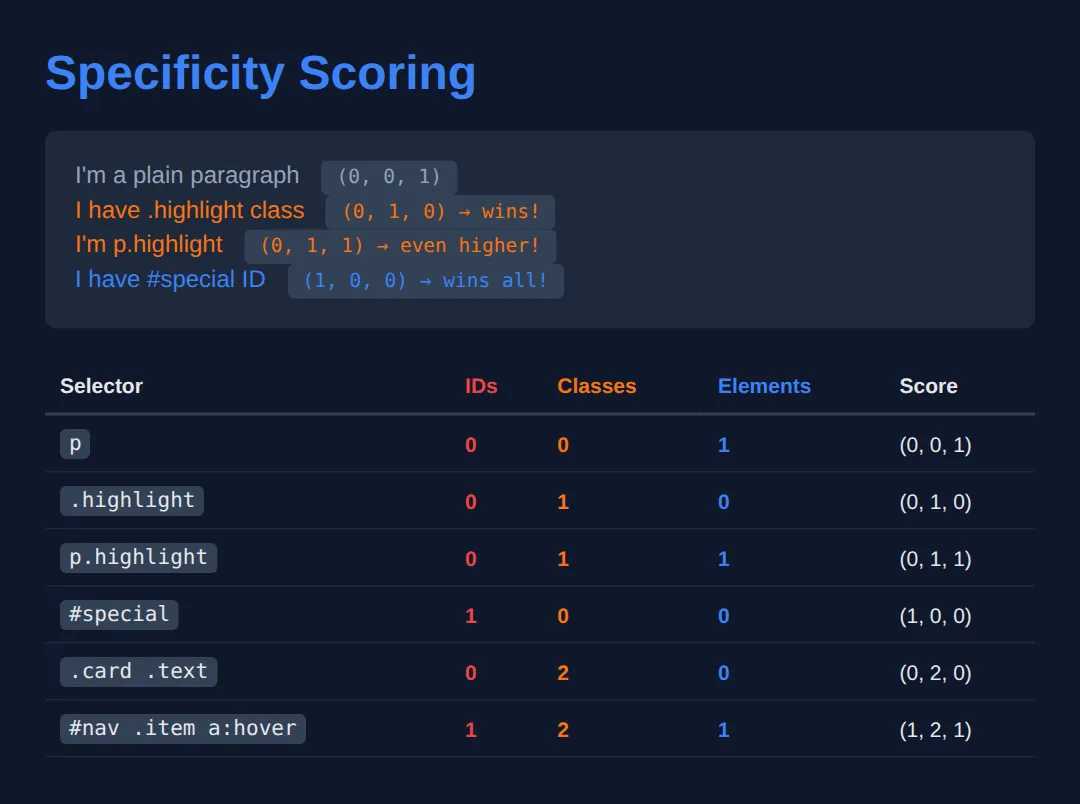
CSS Cascade Layers (@layer)
@layer lets you organize your CSS into priority levels. Later layers override earlier ones, regardless of specificity within the layer.
<!DOCTYPE html>
<html lang="en">
<head>
  <meta charset="UTF-8">
  <title>CSS @layer</title>
  <style>
    * { box-sizing: border-box; margin: 0; padding: 0; }
    body { background: #0f172a; font-family: system-ui, sans-serif; color: #e5e7eb; padding: 30px; }

    h1 { color: #3b82f6; margin-bottom: 20px; }

    /* Define layer order — last layer has highest priority */
    @layer reset, base, components, utilities;

    /* Reset layer (lowest priority) */
    @layer reset {
      * { margin: 0; padding: 0; }
      button {
        font-family: inherit;
        font-size: inherit;
      }
    }

    /* Base layer */
    @layer base {
      .btn {
        padding: 12px 24px;
        border: none;
        border-radius: 8px;
        cursor: pointer;
        font-weight: 600;
        font-size: 14px;
        color: white;
        background: #475569; /* grey default */
        display: inline-block;
        margin: 5px;
      }
    }

    /* Components layer (overrides base) */
    @layer components {
      .btn-primary {
        background: #3b82f6;
      }
      .btn-danger {
        background: #ef4444;
      }
      .btn-success {
        background: #22c55e;
      }
    }

    /* Utilities layer (highest priority — overrides everything) */
    @layer utilities {
      .bg-purple {
        background: #8b5cf6 !important;
      }
      .rounded-full {
        border-radius: 9999px;
      }
      .text-lg {
        font-size: 18px;
      }
    }

    .demo {
      background: #1e293b;
      padding: 20px;
      border-radius: 8px;
      margin: 15px 0;
    }

    .layer-visual {
      display: flex;
      flex-direction: column;
      gap: 4px;
      margin-top: 20px;
    }

    .layer-bar {
      padding: 10px 15px;
      border-radius: 6px;
      font-size: 13px;
      font-weight: 600;
    }

    .note { color: #94a3b8; font-size: 13px; margin-top: 8px; }
    code { background: #334155; padding: 2px 6px; border-radius: 4px; }
  </style>
</head>
<body>
  <h1>CSS @layer</h1>

  <div class="demo">
    <p style="margin-bottom:15px;">Buttons styled across different layers:</p>
    <button class="btn">Default (base)</button>
    <button class="btn btn-primary">Primary (components)</button>
    <button class="btn btn-danger">Danger (components)</button>
    <button class="btn btn-success rounded-full">Success + rounded (utilities)</button>
    <button class="btn btn-primary bg-purple text-lg">Purple override (utilities wins!)</button>
  </div>

  <div class="layer-visual">
    <div class="layer-bar" style="background:#1e293b;border:1px solid #334155;">
      🔽 @layer reset — lowest priority
    </div>
    <div class="layer-bar" style="background:#1e3a5f;">
      @layer base — default styles
    </div>
    <div class="layer-bar" style="background:#1e3a1e;">
      @layer components — feature styles
    </div>
    <div class="layer-bar" style="background:#3b1e5f;">
      🔼 @layer utilities — highest priority (overrides all)
    </div>
  </div>

  <p class="note" style="margin-top:15px;">
    Layer order is set with <code>@layer reset, base, components, utilities;</code><br>
    Later layers always win, even if earlier layers have higher specificity selectors!
  </p>
  <!-- ✅ Expected result, measured in a real browser:
     .btn -> display: inline-block
     .layer-visual -> display: flex
     .btn -> count: 5
  -->
</body>
</html>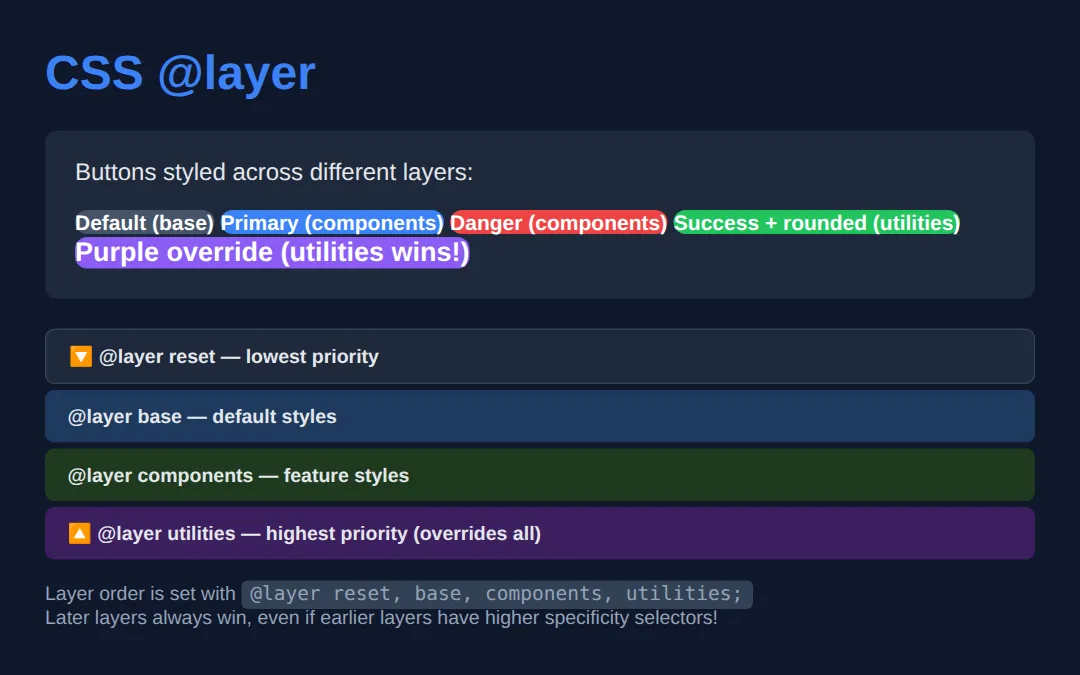
🧠 Worked Example — three cascade results people always get wrong
Read each of the three cases below and predict the colour before you run it. Most people get at least two of them wrong, and each wrong answer is a rule worth knowing. Every declaration here is spelled out in a comment.
<!DOCTYPE html>
<html lang="en">
<head>
<meta charset="UTF-8">
<title>Worked Example: layers beat specificity</title>
<style>
  /* This one line fixes the order of the layers for the whole stylesheet.
     Earliest name = lowest priority. It is written before any layer has
     anything in it, which is the point: order is decided here, not by where
     the rules happen to appear. */
  @layer base, components, utilities;

  body { background:#0f172a; color:#e5e7eb; font-family:system-ui,sans-serif; padding:24px; }
  .row { background:#1e293b; border-radius:8px; padding:14px; margin-bottom:12px; font-size:.95rem; }

  /* ---- CASE A: a very specific rule in an EARLY layer ---- */
  @layer components {
    /* Specificity 1-2-1 — an id, two classes and an element. Enormous. */
    #page .card p.headline { color: #ef4444; }   /* red */
  }
  @layer utilities {
    /* Specificity 0-1-1 — a class and an element. Tiny by comparison.
       It still WINS, because utilities is a later layer than components, and
       layer order is checked BEFORE specificity is even looked at. */
    p.headline { color: #22c55e; }               /* green — this is the winner */
  }

  /* ---- CASE B: the same two layers, but both declarations !important ---- */
  @layer components {
    .imp { color: #ef4444 !important; }          /* red — this is the winner */
  }
  @layer utilities {
    .imp { color: #22c55e !important; }          /* green */
  }
  /* !important REVERSES layer order. For important declarations the EARLIEST
     layer wins, not the latest. That is deliberate: it stops a utility layer
     from steamrolling a deliberate override in your reset. */

  /* ---- CASE C: layered vs not layered at all ---- */
  p.unlayered { color: #f59e0b; }                /* orange — this is the winner */
  @layer utilities {
    #page .card p.unlayered { color: #22c55e; }  /* green, specificity 1-2-1 */
  }
  /* Anything NOT inside a layer behaves as if it were in a final, invisible
     layer after all the named ones. So unlayered CSS beats every layer,
     however specific the layered rule is. */
</style>
</head>
<body>
<div id="page"><div class="card">
  <p class="row headline">A — layered, high specificity vs low</p>
  <p class="row imp">B — both !important, in different layers</p>
  <p class="row unlayered">C — unlayered vs layered</p>
</div></div>

<!-- ✅ What actually happens when you run it:
     A is GREEN. The later layer won even though the losing rule had an id in it.
     B is RED.   With !important the EARLIER layer wins — the order flips.
     C is ORANGE. The unlayered rule beat a layered rule with an id in it.
     Try this: take the @layer utilities wrapper off the green rule in case A so
     it sits loose in the stylesheet. A stays green — but now for a different
     reason: unlayered CSS outranks every layer. -->
  <!-- ✅ Expected result, measured in a real browser:
     .row -> padding-top: 14px
     #page .card p.headline -> color: rgb(34, 197, 94)
     .row -> count: 3
  -->
</body></html>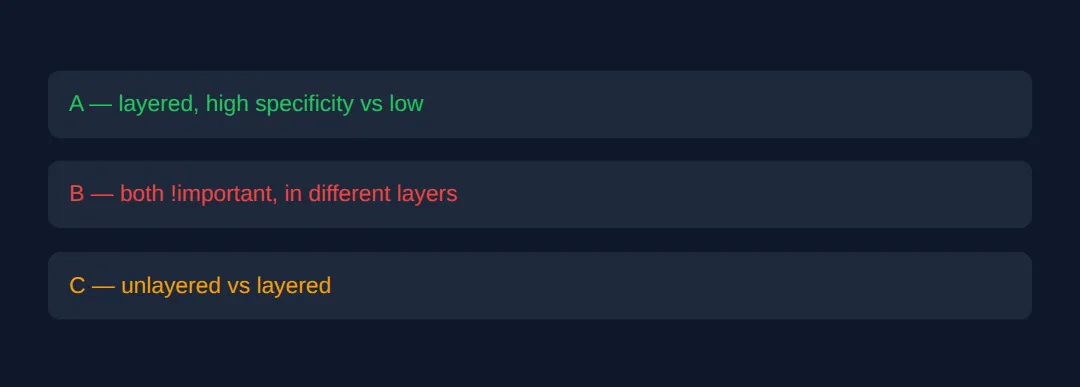
Case C is the one to remember when you start using layers on a real project: if some of your CSS is layered and some is not, the unlayered half quietly wins every fight. Put everything in a layer, or nothing.
🎯 Your Turn — put the layers in the right order
The three @layer blocks below are written in the wrong order on purpose: utilities first, base last. Without an order line, the browser ranks layers by where they first appear, so the base styles are currently beating everything. Fill in the three blanks marked ___ to take control.
<!DOCTYPE html>
<html lang="en">
<head>
<meta charset="UTF-8">
<title>Your Turn: Cascade Layers</title>
<style>
  /* 🎯 YOUR TURN — fill in the three blanks marked ___ */

  /* 1) Declare the running order: base weakest, then components, then utilities
        strongest. Names are separated by commas. */
  @layer ___;
  /* 👉 replace ___ with  base, components, utilities  */

  body { background:#0f172a; color:#e5e7eb; font-family:system-ui,sans-serif; padding:24px; }

  /* 2) These are single-purpose helpers — they belong in the strongest layer. */
  @layer ___ {
    /* 👉 replace ___ with  utilities  */
    .btn-primary { background:#22c55e; }
    .u-hidden { display: none; }
  }

  @layer components {
    #panel .btn.btn-primary { background:#334155; }
  }

  /* 3) These are the plain default styles — they belong in the weakest layer. */
  @layer ___ {
    /* 👉 replace ___ with  base  */
    .btn { display:inline-block; padding:10px 18px; border-radius:8px; border:none;
           font-size:15px; font-weight:700; color:#fff; margin-right:10px; background:#0ea5e9; }
  }
</style>
</head>
<body>
<div id="panel">
  <button class="btn btn-primary">Primary</button>
  <button class="btn">Plain</button>
  <button class="btn u-hidden">Hidden by a utility</button>
</div>

<!-- ✅ Expected once all three blanks are filled: TWO buttons are visible.
     "Primary" is green — the utilities layer beat the components rule that has
     an id in it. "Plain" is blue, from the base layer. The third button has
     vanished, because .u-hidden { display:none } in utilities now outranks
     .btn { display:inline-block } in base.
     Before you fill the blanks (or if you get the order backwards) all THREE
     buttons show, and "Primary" is blue instead of green — that is base winning
     because it was the last layer the browser met. -->
</body></html>
Inheritance
Some CSS properties are inherited by child elements, others are not. Understanding this saves you from writing redundant CSS.
<!DOCTYPE html>
<html lang="en">
<head>
  <meta charset="UTF-8">
  <title>CSS Inheritance</title>
  <style>
    * { box-sizing: border-box; margin: 0; padding: 0; }
    body { background: #0f172a; font-family: system-ui, sans-serif; color: #e5e7eb; padding: 30px; }

    h1 { color: #3b82f6; margin-bottom: 20px; }

    .parent {
      color: #22c55e;
      font-size: 18px;
      font-family: Georgia, serif;
      border: 3px solid #f97316;
      padding: 20px;
      background: #1e293b;
      border-radius: 8px;
      margin: 15px 0;
    }

    .child {
      padding: 15px;
      margin-top: 10px;
      background: #0f172a;
      border-radius: 6px;
    }

    .results {
      display: grid;
      grid-template-columns: 1fr 1fr;
      gap: 10px;
      margin-top: 20px;
    }

    .inherits, .no-inherit {
      padding: 15px;
      border-radius: 8px;
      font-size: 13px;
    }

    .inherits {
      background: #14532d;
      border: 1px solid #22c55e;
    }
    .inherits h3 { color: #22c55e; margin-bottom: 8px; }

    .no-inherit {
      background: #7f1d1d;
      border: 1px solid #ef4444;
    }
    .no-inherit h3 { color: #ef4444; margin-bottom: 8px; }

    ul { list-style: none; }
    li { padding: 3px 0; }

    code { background: #334155; padding: 2px 6px; border-radius: 4px; font-size: 12px; }
  </style>
</head>
<body>
  <h1>CSS Inheritance</h1>

  <div class="parent">
    <strong>Parent:</strong> color: green, font-size: 18px, border: orange, font-family: Georgia
    <div class="child">
      <strong>Child:</strong> I inherit color ✅ and font ✅ — but NOT border ❌ or padding ❌
      <p style="margin-top:8px;">Notice I'm green and serif — inherited from parent!</p>
    </div>
  </div>

  <div class="results">
    <div class="inherits">
      <h3>✅ Inherited Properties</h3>
      <ul>
        <li><code>color</code></li>
        <li><code>font-family</code></li>
        <li><code>font-size</code></li>
        <li><code>font-weight</code></li>
        <li><code>line-height</code></li>
        <li><code>text-align</code></li>
        <li><code>visibility</code></li>
        <li><code>cursor</code></li>
        <li><code>list-style</code></li>
      </ul>
    </div>

    <div class="no-inherit">
      <h3>❌ NOT Inherited</h3>
      <ul>
        <li><code>border</code></li>
        <li><code>padding</code></li>
        <li><code>margin</code></li>
        <li><code>background</code></li>
        <li><code>width / height</code></li>
        <li><code>display</code></li>
        <li><code>position</code></li>
        <li><code>overflow</code></li>
        <li><code>box-shadow</code></li>
      </ul>
    </div>
  </div>
  <!-- ✅ Expected result, measured in a real browser:
     .results -> display: grid
     ul -> list-style-type: none
  -->
</body>
</html>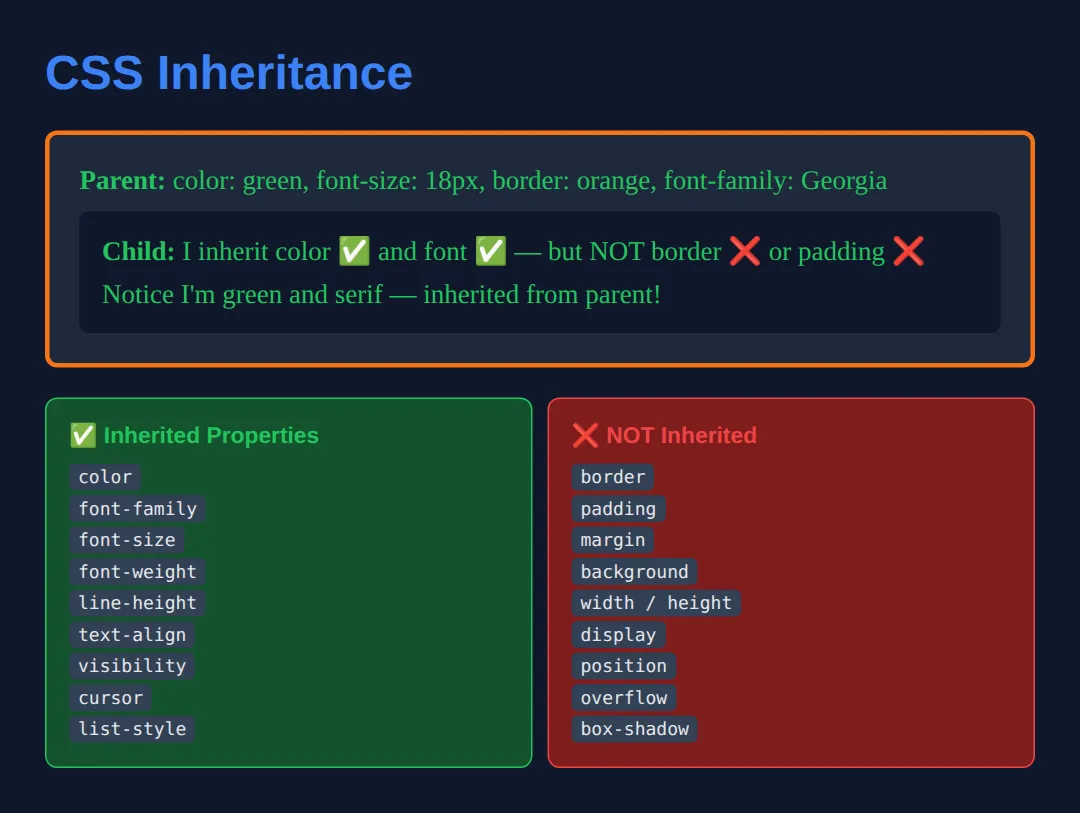
🧩 Mini-Challenge — tame someone else's stylesheet
This is the job cascade layers were invented for. You have dropped a widget into your page and its CSS fights you with #site .widget a.link-style selectors you cannot edit. The old fix was to out-specify it, or reach for !important, and lose either way. The layers fix is two lines. Outline only — you write it.
<!DOCTYPE html>
<html lang="en">
<head>
<meta charset="UTF-8">
<title>Mini-Challenge: Taming Vendor CSS</title>
<style>
  /* 🧩 MINI-CHALLENGE: make YOUR styles win without raising specificity
     The two "vendor" rules below are pretend third-party CSS. They use an id and
     two classes, so on specificity alone they crush anything you write with a
     single class. You may WRAP them in a layer, but do not rewrite the selectors
     inside them, and do not use !important anywhere.

     1. Declare the order:  @layer vendor, app;   (vendor weakest, app strongest)
     2. Wrap the two vendor rules in  @layer vendor { ... }
     3. Write your own rules inside  @layer app { ... }  using ONLY single-class
        selectors:
          .link  -> colour #22c55e, text-decoration: none, font-weight: 700
          .box   -> background #1e293b, border 1px solid #334155,
                    border-radius 12px, padding 16px

     ✅ How to check it: the link should be green, bold and NOT underlined, sitting
        in a dark rounded box with a thin solid grey border. If you still see a red
        underlined link in a dotted maroon box, the vendor rules are still winning —
        either the order line is missing, or your rules are not inside @layer app.

     In real projects you do step 2 at import time instead of copy-pasting:
        @import url("widget.css") layer(vendor);
     which drops the whole file into the vendor layer without editing one line of it.
  */

  body { background:#0f172a; color:#e5e7eb; font-family:system-ui,sans-serif; padding:24px; }

  /* --- pretend third-party CSS: do not edit these two rules --- */
  #site .widget a.link { color:#ef4444; text-decoration: underline; font-weight: 400; }
  #site .widget .box { background:#7f1d1d; border: 4px dotted #ef4444; padding: 20px; border-radius: 0; }
  /* --- end of third-party CSS --- */

  /* your layers here */

</style>
</head>
<body>
<div id="site"><div class="widget">
  <div class="box"><a class="link" href="#">Styled by my rules, not theirs</a></div>
</div></div>
  <!-- ✅ Expected result, measured in a real browser:
     #site .widget a.link -> text-decoration-line: underline
     #site .widget .box -> padding-top: 20px
  -->
</body></html>
⚠️ Common Mistakes
- Over-using !important — It breaks the natural cascade and makes debugging nightmares. Only use it for utility classes in a layer-based architecture.
- ID selectors for styling — IDs have very high specificity (1,0,0). Prefer classes (0,1,0) which are easier to override.
- Not understanding source order — When two selectors have equal specificity, the last one in the stylesheet wins.
- Confusing @layer order with specificity — Layer order takes priority over specificity. A low-specificity rule in a later layer beats a high-specificity rule in an earlier layer.
🎉 Lesson Complete
You now understand exactly how the browser resolves CSS conflicts:
- ✅ Cascade order: !important → inline → layers → specificity → source order
- ✅ Specificity: IDs (1,0,0) > classes (0,1,0) > elements (0,0,1)
- ✅ @layer organises styles with explicit priority
- ✅ Text properties inherit; box properties don't
Practice quiz
In the cascade, which factor has the highest priority?
- Source order
- Specificity
- Cascade layer order
- !important
Answer: !important. !important sits at the top of the resolution order, above inline styles, layers, and specificity.
What is the specificity score of the selector #special?
- (0, 0, 1)
- (0, 1, 0)
- (1, 0, 0)
- (1, 1, 1)
Answer: (1, 0, 0). An ID selector contributes to the ID column, giving #special a specificity of (1, 0, 0).
Which selector wins between '.highlight' and 'p'?
- p, because elements are stronger
- .highlight, because a class beats an element
- Whichever comes last
- Neither — it is an error
Answer: .highlight, because a class beats an element. A class (0,1,0) outranks an element (0,0,1), so .highlight wins regardless of order.
With @layer reset, base, components, utilities; which layer has the highest priority?
- reset
- base
- components
- utilities
Answer: utilities. Later-declared layers win, so utilities (declared last) has the highest priority.
How does cascade layer order interact with specificity?
- Specificity always beats layer order
- Layer order takes priority over specificity
- They are added together
- Layers ignore specificity entirely within a layer
Answer: Layer order takes priority over specificity. Layer order outranks specificity: a low-specificity rule in a later layer beats a high-specificity rule in an earlier one.
Which of these CSS properties is inherited by child elements by default?
- border
- padding
- color
- background
Answer: color. Text-related properties like color inherit; box properties such as border, padding, and background do not.
When two selectors have equal specificity, which rule wins?
- The first one in the stylesheet
- The last one in the stylesheet
- Neither applies
- The shorter selector
Answer: The last one in the stylesheet. With equal specificity, source order decides: the last matching rule wins.
What is the specificity of '.card .text' (two classes)?
- (0, 1, 0)
- (0, 2, 0)
- (1, 0, 0)
- (0, 0, 2)
Answer: (0, 2, 0). Two class selectors give (0, 2, 0).
Which CSS property is NOT inherited by default?
- font-family
- line-height
- text-align
- margin
Answer: margin. margin is a box property and is not inherited; font-family, line-height, and text-align all inherit.
Why is overusing !important considered bad practice?
- It is invalid CSS
- It breaks the natural cascade and makes debugging hard
- It only works in Firefox
- It slows down rendering
Answer: It breaks the natural cascade and makes debugging hard. !important short-circuits the cascade, making conflicts hard to trace and override.
Continue this course
- Previous: Container Queries & Modern Responsive Techniques
- Next: Advanced Selectors: :has(), :is(), :where(), nth-child mastery — Use modern selectors to write less CSS and target elements precisely
- Quick reference: HTML & CSS cheat sheet · CSS Selectors cheat sheet › Specificity & Cascade